
Transpose Is a Tool, Not a Cheat
Professional singers transpose constantly—in studio, on tour, for aging voices, for different moods. Changing key does not mean you "failed" the original; it means you chose a version where the melody lives in your comfortable tessitura instead of at the edge of strain.
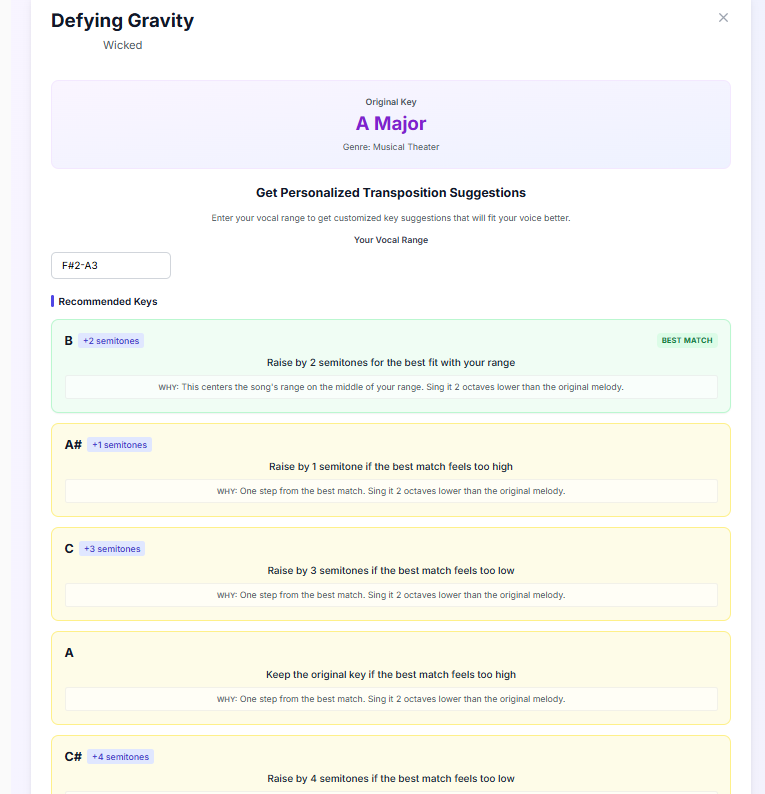
This guide walks through a semitone-by-semitone workflow you can repeat for any song: find the key, map the peaks, compare to your range, move the key, verify with SingMeter tools. For hands-on practice, also see the transpose a song tutorial.
What You Are Actually Matching
Your vocal range test gives you lowest and highest usable notes. Song picking needs more: where the melody spends most of its time and which chorus notes repeat under emotion. Read tessitura and comfortable range if those terms are new.
- Peak note: the highest sustained pitch in the chorus (not a quick scoop)
- Tessitura band: the 4–6 notes that appear most often in the verse and chorus
- Comfort margin: at least a whole step below your shouted peak for repeated chorus work
A song whose only high note is a brief flip might be fine in the original key; a song that sits high for eight bars is not— even if you can touch the peak once during a range test.
Step 1: Find the Song Key
Use the Song Key Finder or a reliable chart for your track. Write down:
- Key name (e.g. G major)
- Top 3 melody notes in the chorus (use sheet music, a MIDI chart, or careful listening)
- Whether the recording is slightly sharp/flat vs standard pitch (some older tracks are)
If you only know the guitar chords, that still helps—but melody peaks matter more than chord roots for singers. When in doubt, hum the chorus against the Tone Generator to identify the highest stable note.
Step 2: Compare to Your Range Data
Run or review your Vocal Range Test. Mark your comfortable top—not the one heroic squeak—and your easy speaking-singing zone. Lay the chorus peaks on that map:
- Green: peaks sit inside comfortable top with room to add volume
- Yellow: peaks are reachable but only at soft volume or with tension
- Red: peaks exceed comfortable top or require shouting
Yellow and red both mean transpose down until the chorus is green at speaking-plus volume. More song-picking context: songs that fit your range.
Step 3: Move by Semitones (Not Guessing)
Each semitone down lowers every melody note by one half-step. Typical starting moves:
- Yellow chorus: try −1 semitone first
- Red peak only: try −2 semitones
- Whole song feels high: try −3 or −4, but check the verse does not become muddy low
In karaoke apps, use the built-in key control. At home, change the playback key in your DAW, YouTube pitch shifter (careful with quality), or a transpose-friendly app. Write the new key on your song list so you do not rediscover it every month.
If the song was written for a very different voice—a soprano showtune and a bass range, for example—a few semitones will not close the gap. Singers usually take the melody an octave (or two) down first, then fine-tune the key.
Step 4: Verify With Tools (3-Minute Check)
- Play the new highest chorus note on the Tone Generator
- Hum-match softly, then at performance volume
- Open the Pitch Detector and sing the hook once
- If sharp only when loud, stay softer or see sharp fixes
- If flat on endings, see flat fixes before lowering the key again
Transposing fixes range fit; it does not fix breath or tension habits. If the key is green but pitch still wobbles, spend ten minutes on phrase work— record yourself on the hook.
Worked Example: Pop Chorus in B Major
Original key: B major. Chorus peak: F#5 sustained. Your comfortable top: E5 at moderate volume.
- Status: red—peak is a semitone above comfortable top
- Transpose −1 to A major → peak becomes E5 (yellow/green borderline)
- Detector check: stable at soft volume, sharp when shouting → keep A major, train softer delivery
- If still strained, −2 to Ab major → peak D5, verse checked for low-end mush
Final choice: A major with conversational volume on the hook. Logged in song notes. Next practice day starts there—no re-debate.
When to Transpose Up
Sometimes the original is too low—you lose energy or drop into vocal fry. If the verse sits below your comfortable bottom, try +1 or +2 semitones. The same verify step applies: chorus peaks must stay green, and the low notes must not feel swallowed. Balance matters more than copying the artist's octave.
Transpose vs Change the Arrangement
Lowering the key fixes high peaks but can make a sparse verse feel boring. Options:
- Transpose the whole track (simplest)
- Transpose only the chorus in live performance (advanced—needs practice)
- Octave-unison on the worst peak while keeping the rest in original key (last resort—can sound thin)
- Pick a different song with similar vibe but kinder tessitura
For most home and karaoke singers, whole-track transpose is the right 90% answer.
Building a Personal Key Library
In a spreadsheet or notes app, columns: Song | Original key | Your key | Date tested | Peak note | Notes. Update after each range test because comfortable top can shift with training or rest. Share the list with bandmates or karaoke friends so you do not relearn the same lesson on stage.
Common Transpose Mistakes
- Only checking the one highest note, ignoring repeated mid-high tessitura
- Lowering until the verse disappears into mumble range
- Changing key every practice day—no stable reference to improve technique
- Assuming pitch problems are always key problems (tension can mimic "too high")
- Forgetting to save the new key in the karaoke app preset
Pair With Practice, Not Avoidance
Transpose to sing well tonight; train range and mix over weeks to widen choices tomorrow. High-note strategy: how to sing high notes. Daily structure: daily practice routine. Before a night out: karaoke prep.
Quick Reference
- Find key + chorus peaks (Song Key Finder)
- Compare to comfortable range / tessitura
- Move −1/−2 semitones if yellow/red
- Verify peaks on Tone Generator + Pitch Detector
- Log your key; practice phrases in that key for a week
Next step: pick one song, find its key, and transpose until the chorus peaks are green at speaking-plus volume.